Node Program · Earnings
Metered per MB, logged end to end
Tianqing nodes are paid on exactly one basis: traffic your device actually carries and completes. This page lays out billing, settlement and withdrawal in full — including what shrinks your earnings and what produces none at all.
Earnings depend on the traffic your device actually carries and on scheduling demand. There is no guaranteed minimum. Every figure on this page is a worked example of the published rules, not a promise of income.
Billing basis
Traffic, not uptime
Points are the only unit of node earnings. They come from traffic alone and have nothing to do with how long a device has been switched on.
10points / MB
1 MB = 10 points
Traffic your device actually carries and completes is metered per MB, at 10 points per MB. The "Today" figure on the app's overview screen is that day's running total for this device.
20points / MB
Double from 19:00 to 21:00
Traffic carried between 19:00 and 21:00 local time counts double, at 20 points per MB. Staying online and stable through those two hours is the most productive window for the same volume of traffic.
Metered on traffic, never on hours
Being online is not the same as earning. Only traffic that is scheduled to your device and completes successfully earns points — every rule further down this page follows from that.
- A device online all day with no connections routed to it earns zero points that day. That is not a fault.
- Over the same 24 hours online, carrying 10 GB earns ten times what carrying 1 GB earns.
- Requests that fail, are blocked, or never complete carry no metered traffic and therefore earn nothing.
Scheduling volume is driven by real customer demand. No device is promised an allocation of traffic.
Worked example
Traffic into points
Applying the two rates above, here is what different daily volumes and different peak-hour shares work out to.
| Traffic carried per day | 0% in peak hours | 20% in peak hours | 40% in peak hours |
|---|---|---|---|
| 1 GB | 10,240 / day307,200 / mo | 12,288 / day368,640 / mo | 14,336 / day430,080 / mo |
| 3 GB | 30,720 / day921,600 / mo | 36,864 / day1,105,920 / mo | 43,008 / day1,290,240 / mo |
| 10 GB | 102,400 / day3,072,000 / mo | 122,880 / day3,686,400 / mo | 143,360 / day4,300,800 / mo |
Assumptions: 1 GB = 1024 MB, 10 points per MB at the base rate, 20 points per MB between 19:00 and 21:00, and 30 days to a month. "Peak share" is the portion of that day's traffic falling inside 19:00–21:00.
The points-to-cash rate is whatever the app's withdrawal screen currently shows.
These are arithmetic illustrations of the published rules, not income projections. Actual earnings are whatever the app settles. The daily volumes are assumptions and do not represent any device's real scheduled traffic.
What moves it
What drives earnings
The same handset on two different networks can produce very different results. These five things matter most.
Upstream bandwidth
Carrying traffic consumes upstream capacity. A normal home broadband line is enough to start; more upstream raises the ceiling on what can complete. When upstream saturates, new connections slow down noticeably or fail outright.
Uptime and stability
Uptime itself pays nothing, but dropping offline cuts live connections mid-flight. Keep the device on mains power, turn off battery saver, and whitelist the app for autostart and battery optimisation so it stays available.
Shared exit IP, shared earnings
Scheduling allocates traffic per exit IP. Several devices on one broadband line or one SIM share that IP's allocation, so total earnings are split between them rather than multiplied. Scaling up means another line or another SIM — not more handsets on the same network.
Carrier eligibility
Only exits on China Telecom, China Unicom, China Mobile, China Broadnet (CBN) or CERNET enter the dispatch pool. Datacentre IPs (cloud servers), overseas ISPs and lines whose ownership cannot be identified are excluded: the device still shows as online but never receives a connection, with status isp_error. The policy converges through gateway heartbeats, so a network change takes effect within roughly 15 seconds.
New-device ramp-up
A newly registered device ramps up gradually. Low connection counts and low earnings over the first few days are normal, and a "current connections" reading of 0 is common. Give it one to three days online before drawing conclusions.
These factors affect the ceiling and the odds of being scheduled; none of them constitutes a promise of earnings. New devices go through a ramp-up period during which low connection counts and earnings are expected.
Settlement
Hourly, to your account
Points are not credited in real time. A scheduled job on the control plane aggregates each hourly window and writes it to the settlement ledger.
Hourly settlement windows
Traffic first lands in the current hour's settlement window. Points are computed once that window closes, which is why traffic you just carried does not appear in your balance immediately.
Written to a ledger
Each window is posted as its own ledger entry, traceable back to a device and a time range. Your withdrawable balance is derived from that ledger.
Aggregated by phone number
Earnings belong to an account, not to a device. Everything under one phone number is pooled, so a multi-device deployment still needs only one account.
You can run a node without binding a phone number, but the overview screen will then count only this handset. Binding is what shows the combined total across all your devices — and it is a precondition for withdrawing.
Withdrawals
Points to Alipay
Withdrawals are paid by Alipay transfer. Each request passes through review and then payout, and every state is visible in the app.
Three things to set up first
Until all three are done, the withdrawal entry is only a prompt telling you what is still missing.
Bind a phone number
Sign in with your phone number from the top of the app's settings screen. Earnings settle to an account, so without one there is no withdrawable balance.
Complete identity verification
Verification attaches to the phone account, not to a device. The withdrawal entry stays disabled until it is done.
Add an Alipay payee
Enter the receiving Alipay account and the payee's real name. Alipay checks the name, and a mismatch is refused outright.
Enter the payee name exactly as it appears on the ID document. A wrong name is rejected by Alipay at payout time, not at submission. The payout account and verified identity must belong to the participant, who should be an adult with full legal capacity.
How one request moves
The main path has exactly three states, and no step is ever skipped.
- 1
pendingAwaiting review
Submitted successfully. The corresponding points are frozen while an administrator reviews the request.
- 2
payingPaying out
Approved, and the transfer has been issued to Alipay. The system now waits for an authoritative result.
- 3
successPaid
Alipay has confirmed the transfer. The frozen points are deducted for good and the request is closed.
Two branches
rejectedThe administrator declined the request. Frozen points are returned in full and the balance is restored; you can correct the details and submit again.
failedReached only after Alipay explicitly reports a failure — a name mismatch or a problem with the account, for instance. Frozen points are returned in full and the reason is recorded on the request.
Three rules that never bend
These are structural guarantees of the payout path, not policies that get relaxed when business changes.
Uncertain means it stays "paying out"
If the network times out or the channel returns nothing conclusive, the request stays in "paying out" until Alipay gives an authoritative answer. The system never guesses at an outcome, and never pays twice because it was unsure.
One request, one merchant order number
Each withdrawal maps to exactly one merchant transfer order number, and retries reuse that same number. Even if a duplicate request reaches Alipay, it can only ever succeed once.
Every step is audit-logged
Who approved it, when, the transfer order number, the final state and any failure reason are all written to the audit log and can be traced back request by request.
How the withdrawable balance is derived
Withdrawable = settled balance − in flight (awaiting review + paying out) − already paid
Requests that are submitted but not yet closed hold your balance, so it drops the moment you submit one. If that request is rejected or the payout fails, the held portion is returned and the balance recovers.
Payee details are masked
138****1001陈*The receiving account and payee name are always masked in the admin console. Operations and review staff see only enough to cross-check, never the full values.
Minimum per transfer
Alipay transfers carry a floor of CNY 0.1 per transaction, so anything below that cannot be paid out. Check that your withdrawable balance clears that floor before you submit.
Review and payout outcomes follow Alipay's final determination. No processing time is promised for any individual request. Any personal income tax or other levies arising from a payout are declared and borne by the payee, as required by law.
In the app
The withdrawal screen
Real-device screenshots. Before a phone number is bound and identity is verified, the withdrawal entry stays in its prompt state.
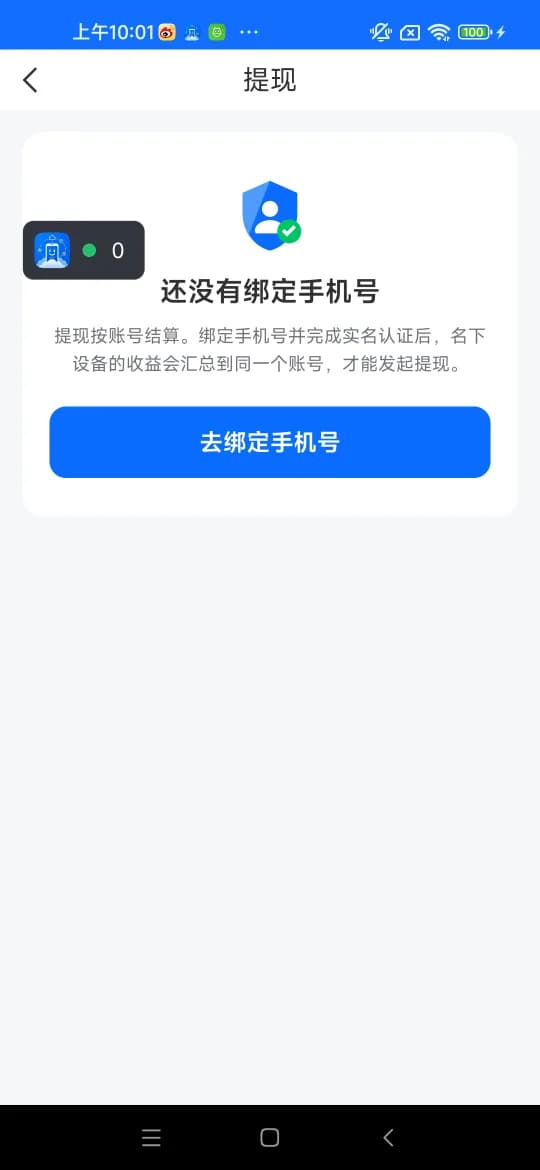
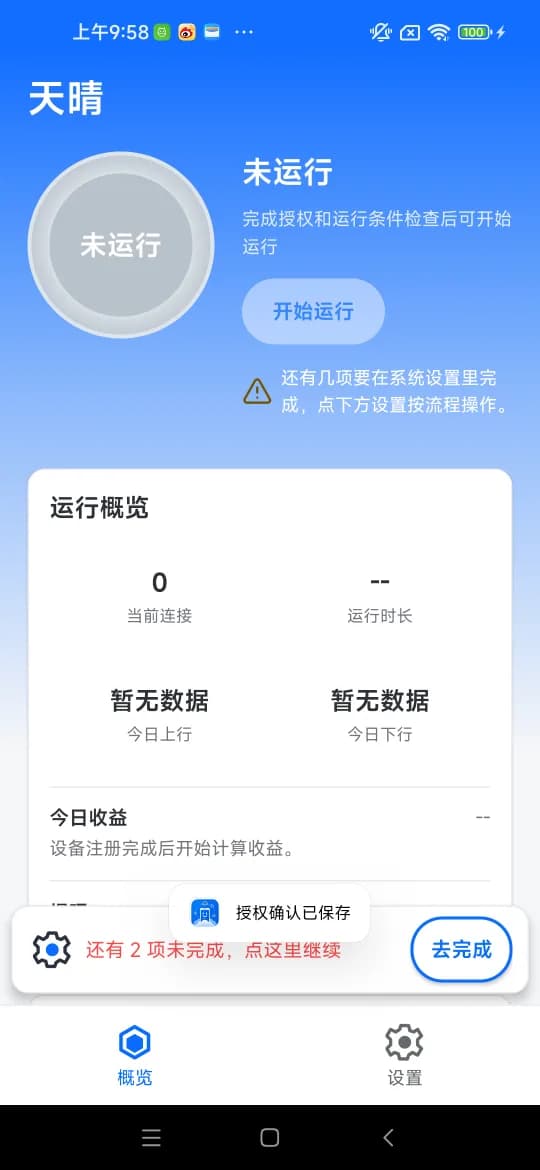
Captured on a Redmi handset running Android 12. The interface changes between releases; the app itself is authoritative.
Install it and start
The APK is distributed directly from this site, not through third-party app stores. For a first setup, follow the illustrated guide — permissions and background settings are the step people most often miss.
Android 7.0 and above only; iOS is not supported. Emulators, cloud phones and datacentre networks are never scheduled.