1 MB of traffic carried = 10 points, doubled at peak hours
A spare Android phone, a charging cable and a home broadband line are all it takes to join the dispatch pool with the Tianqing app. Points are credited only for traffic your device actually carries, and the metering rules, outbound blocklist and settlement method are all published.
Earnings depend on the traffic your device actually carries and on real scheduling demand. The platform makes no guaranteed-return commitment.
0pts/MB
Credited on traffic actually carried, not on uptime
0pts/MB
Doubled every day between 19:00 and 21:00
Hourly
Settled in hourly windows, each written to the ledger
Android 7.0+
No root, any brand — plug it in and connect it
Earnings depend on the traffic actually carried and on scheduling demand; the platform makes no guaranteed-return commitment.
Earnings estimator
Run the numbers first
Curious how many points your line could earn in a day? Drag the sliders and the estimate updates using the published metering rules.
Traffic carried per day
3 GB
This is traffic actually routed through your device, not your broadband data cap.
Share carried at peak hours
20%
The share carried between 19:00 and 21:00, when 1 MB is worth 20 points.
Devices connected
1
One account can hold several devices; whether more of them means more points depends on whether they share an exit IP.
Devices behind the same exit IP are merged into a single settlement unit and split the points evenly — adding phones does not raise the total, it only divides the same points among more devices.
Estimated points per day
36,864points
About 36,864 points per day for each of the 1 devices
The points-to-cash rate is whatever the withdrawal screen in the app shows at the time.
These are estimates derived from the published rules, not a promise of earnings; actual figures are whatever the app settles. New devices also go through a ramp-up period while scheduling picks them up.
Why bother
Easy to run, fully under your control
Turn the Android phone gathering dust in a drawer into an exit node — published rules, stoppable at any moment.
Works while idle
Leave it plugged in out of the way; it earns whenever traffic is actually scheduled to it.
Credited on traffic actually carried: 1 MB = 10 points
Between 19:00 and 21:00 every day, 1 MB = 20 points
Settled in hourly windows, each written to the ledger
Stays out of your way
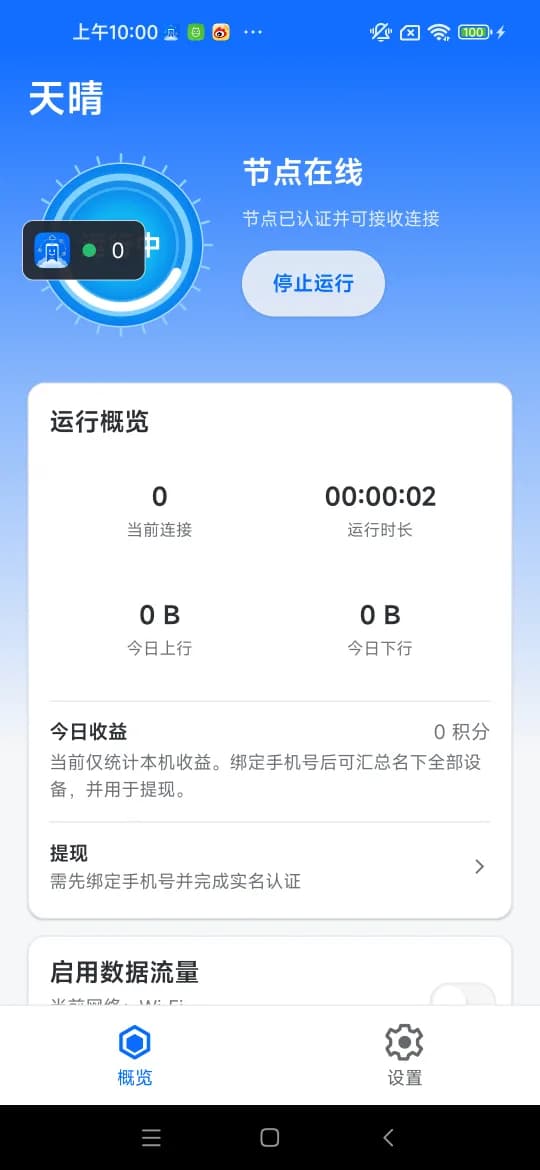
No root needed. It runs as a background service with a small floating status window, and the phone stays yours to use.
No root, any brand, anything on Android 7.0 or newer
Check status in the floating window; tap Stop to leave the pool
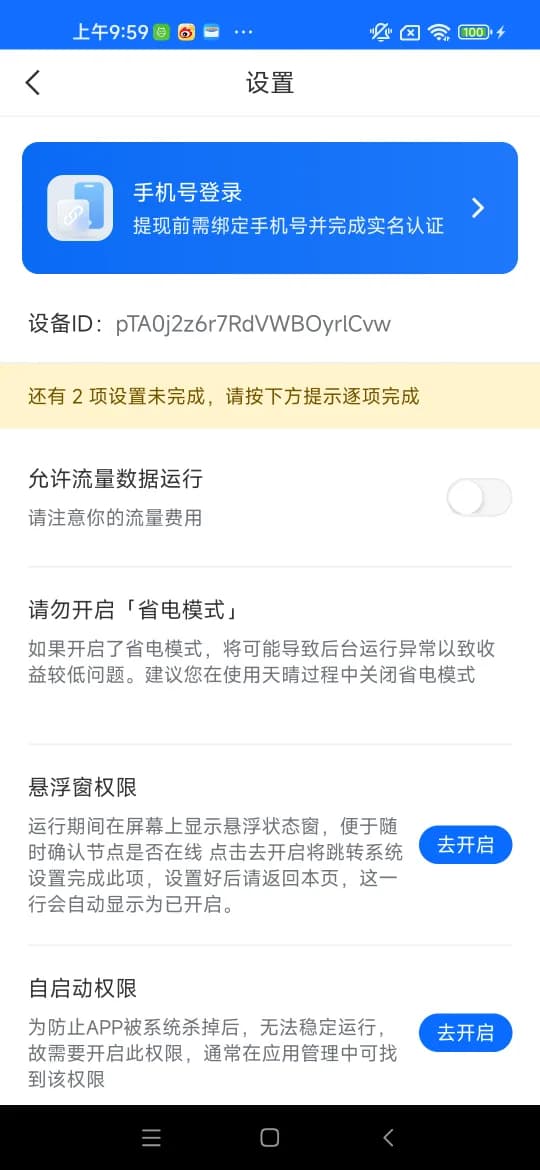
Mobile data is off by default — enable it yourself, at your own cost
Compliant and open
Outbound traffic is filtered against a live blocklist and every sensitive action is logged.
Outbound domain blocklist enforced live — a new rule takes effect at once
First launch requires consent to the terms, privacy policy and exit authorisation
Device changes, blocklist edits and payout reviews all hit the audit log
Earnings depend on the traffic actually carried and on scheduling demand; the platform makes no guaranteed-return commitment.
Getting started
Four steps to join the pool
Everything happens on the phone — no computer, no flashing.
01
Install the app
Download the Tianqing APK straight from this site; no third-party app store is involved.
02
Clear the checks
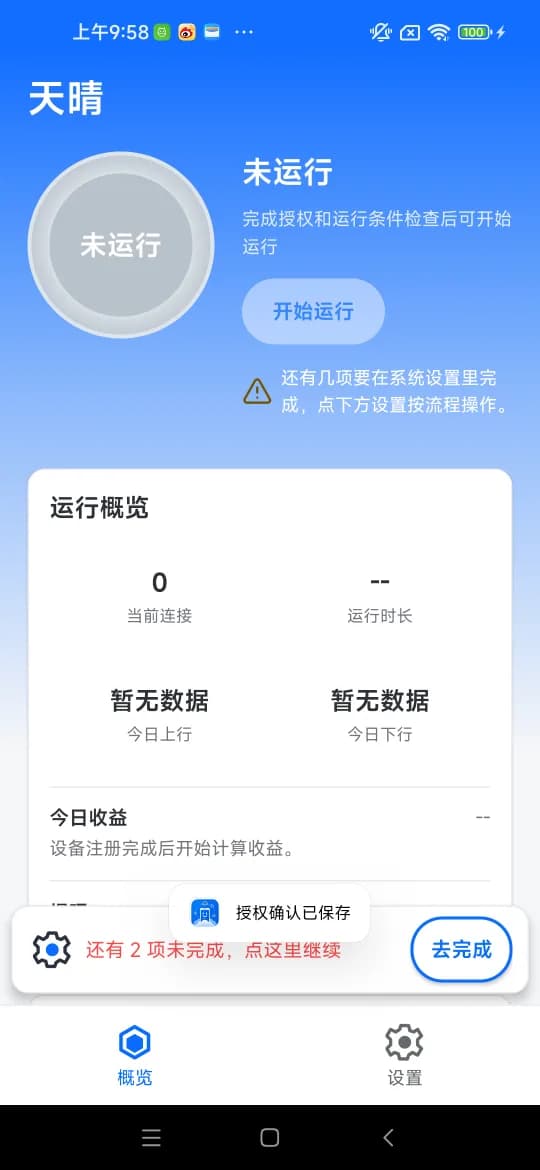
Work through the readiness checklist in the app — Start stays disabled until every item passes.
03
Stay online
Grant the floating window, autostart and battery-optimisation exemptions, then leave it plugged in.
04
Verify and withdraw
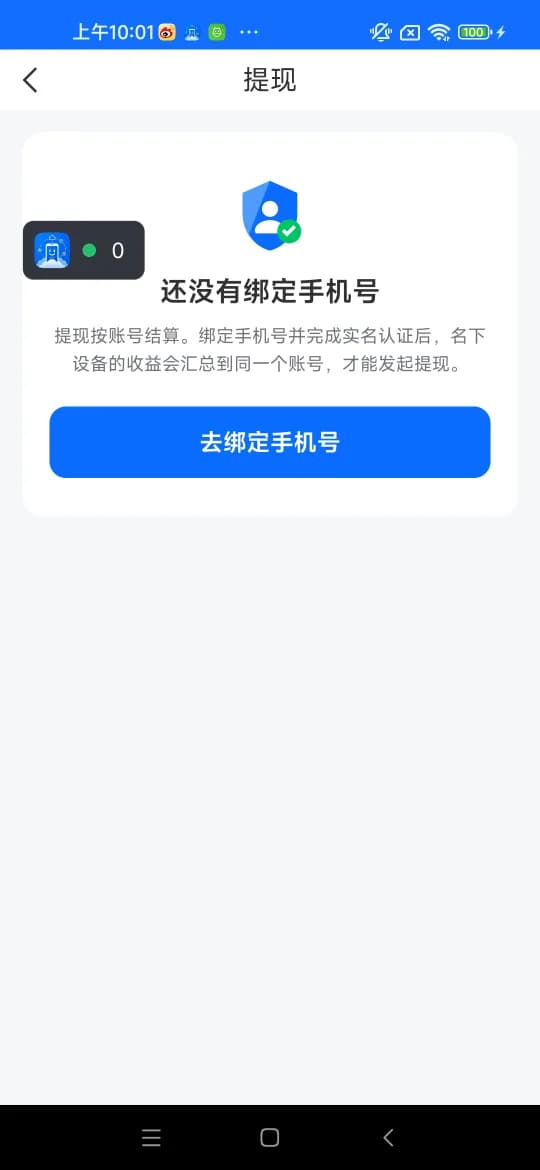
Bind a phone number, complete identity verification, then request an Alipay payout in the app.
Earnings rules
Every metering rule, published
Six rules decide what you earn. Nothing else is hiding behind them.
Metered on traffic, not uptime
Points come from traffic your device actually carries: 1 MB = 10 points. A device that sits online without carrying traffic earns nothing.
Peak hours pay double
Traffic carried between 19:00 and 21:00 each day is worth 20 points per MB.
One exit IP, points split
Devices behind the same broadband line are merged into one settlement unit; the total is split between them and does not grow with device count.
Settled hourly
A scheduled job on the control plane writes each hourly window into the settlement ledger, so every window can be traced.
Totalled per account
Earnings are totalled per account (phone number) rather than per device, and one account can hold several devices.
New devices ramp up
A freshly connected device sees few connections and low earnings for the first few days; a connection count sitting at zero is common early on.
Earnings depend on the traffic actually carried and on scheduling demand; the platform makes no guaranteed-return commitment, and the points-to-cash rate is whatever the withdrawal screen in the app shows.
Device and network
What kind of phone works
The bar is low, but a few requirements are hard ones — devices that miss them are never scheduled.
Item
Requirement
System
Android 7.0 or newer; iOS is not supported
Root
Not required; any handset brand is fine
Network
Wi-Fi or mobile data both work; mobile data is off by default and must be enabled in the app, at your own cost
Power
Keep it plugged in and turn battery saver off
Bandwidth
The more upstream you have, the higher the ceiling; a home line is enough to start
Permissions
Floating window (status overlay) plus autostart and battery-optimisation exemptions, so the system does not kill it
These devices are never scheduled
Emulators
Cloud phones
Data-centre networks
None of these ever enter the dispatch pool or earn any points, however long they are left running.
Carrier eligibility for exits
Only exits on China Telecom, China Unicom, China Mobile, China Broadnet (CBN) or CERNET enter the dispatch pool. Data-centre IPs (including every cloud provider), overseas ISPs and lines whose ownership cannot be identified stay out — the device still shows as online but never receives a request, and is marked isp_error.
Earnings depend on the traffic actually carried and on scheduling demand; the platform makes no guaranteed-return commitment.
Compliance
Compliant by design, traceable end to end
Compliance is the other half of this programme. The four things below are shipped mechanisms, not slogans.
Live outbound blocklist
The control plane writes domain rules into Redis and broadcasts them over Pub/Sub; the gateway matches them as each stream opens. A rule added in the console takes effect immediately, the client is answered with TARGET_DENIED on the spot, and no retry is sent to another device. Matching happens live on the domain — the destinations and contents of the traffic relayed through your device are not recorded.
Consent enforced at first launch
The app cannot be used until the user agreement, the privacy policy and the network exit authorisation have all been accepted. Each document carries a server-computed SHA256 that the client verifies, and a new release takes effect at once.
Verified identity before payout
Verification attaches to the phone-number account rather than the device. No payout can be requested without a bound phone number and completed identity verification, and payee accounts and names are masked in the console — staff never see them in the clear.
Audited throughout, stored in China
Device state changes, bans, blocklist edits, eligibility policy changes, legal document releases, payout reviews and transfers all go into the audit log, and data is stored on servers inside mainland China.
The six questions we hear most, answered against the actual rules.
How much can I actually earn?
It depends entirely on how much traffic your line ends up carrying. The metering is public: 1 MB = 10 points, doubled to 20 points per MB between 19:00 and 21:00. There is no guaranteed return and no earnings leaderboard, and the points-to-cash rate is whatever the withdrawal screen in the app shows.
How many phones can I run on one line?
Devices behind the same exit IP are merged into one settlement unit and split the points evenly, so stacking phones on one broadband line does not increase the total. Scaling up means another line or another SIM, not more phones on the same connection.
Does it burn through data and battery?
It uses Wi-Fi by default; mobile data is off unless you enable it in the app, and any charges are yours. Keep the phone plugged in with battery saver off, or the system will kill the background service and an offline device earns nothing.
Can I still use the phone normally?
Yes. The app needs no root and runs as a background service with a small floating window. Tap Stop whenever you want to leave the pool, or simply uninstall it.
Which devices will not work?
Emulators, cloud phones and data-centre networks are never scheduled and never earn. Carrier eligibility is enforced by default: only exits on China Telecom, China Unicom, China Mobile, China Broadnet or CERNET join the pool, while data-centre IPs are marked isp_error and never receive a request even though the device looks online.
How do I cash points out?
Bind a phone number and complete identity verification, then add an Alipay payee account in the app (the payee name must match your verified identity). An administrator reviews the request and approval moves it to payment. A rejection or a failed transfer returns the frozen points in full.
How much can I actually earn?
It depends entirely on how much traffic your line ends up carrying. The metering is public: 1 MB = 10 points, doubled to 20 points per MB between 19:00 and 21:00. There is no guaranteed return and no earnings leaderboard, and the points-to-cash rate is whatever the withdrawal screen in the app shows.
How many phones can I run on one line?
Devices behind the same exit IP are merged into one settlement unit and split the points evenly, so stacking phones on one broadband line does not increase the total. Scaling up means another line or another SIM, not more phones on the same connection.
Does it burn through data and battery?
It uses Wi-Fi by default; mobile data is off unless you enable it in the app, and any charges are yours. Keep the phone plugged in with battery saver off, or the system will kill the background service and an offline device earns nothing.
Can I still use the phone normally?
Yes. The app needs no root and runs as a background service with a small floating window. Tap Stop whenever you want to leave the pool, or simply uninstall it.
Which devices will not work?
Emulators, cloud phones and data-centre networks are never scheduled and never earn. Carrier eligibility is enforced by default: only exits on China Telecom, China Unicom, China Mobile, China Broadnet or CERNET join the pool, while data-centre IPs are marked isp_error and never receive a request even though the device looks online.
How do I cash points out?
Bind a phone number and complete identity verification, then add an Alipay payee account in the app (the payee name must match your verified identity). An administrator reviews the request and approval moves it to payment. A rejection or a failed transfer returns the frozen points in full.
The APK is served directly from this site, with no third-party app store in between. Install it, clear the readiness checklist in the app, and the device joins the dispatch pool.
If the system warns about unknown sources, allow this browser to install apps on the settings page it opens, then go back.
Check that the terms of the network you use permit sharing bandwidth before joining. Earnings depend on the traffic actually carried and on scheduling demand, and the platform makes no guaranteed-return commitment.